1. S60Bible for Symbian S60, S80 (i use this on Nokia 6630)
This app is a Symbian Bible. S60Bible reads Bible in Palm e-book format (.pdb). There are many Bibles in .pdb format on the Internet. You can get many language versions (.pdb) from PalmBible+.

Steps for installing S60Bible :
A. First Download the application/software to read the Bible (in .PDB format):
>> Download FREE S60Bible via www.compactbyte.com/symbianbible/
>> Install S60Bible reader on your device.
B. Copy the .PDB file of the Bible to your device.
There are many Bibles in .pdb format on the Internet. You can get many language versions (.pdb) from PalmBible+.
Bible in Indonesian can be downloaded from www.fica.org/PembacaAlkitab/
In fica.org, you'll get some Indonesian versions: Terjemahan Baru (New Translation), Terjemahan Lama (Old Translation), Bahasa Indonesia Sehari-hari (Indonesian Daily Language), Bahasa Batak Toba (Batak Toba Language).
Di situs fica.org tersebut nantinya ada beberapa versi translansi bahasanya, antara lain:
- Terjemahan Baru (New Translation) Copyright Lembaga Alkitab Indonesia, 1994.
- Terjemahan Lama (Old Translation) Copyright Lembaga Alkitab Indonesia, 1994.
- Bahasa Indonesia Sehari-hari (Indonesian Daily Language) Copyright Lembaga Alkitab Indonesia, 1994.
- Bahasa Batak Toba (Batak Toba Language)
Alternatively, Holy Bible in Chinese, English (King James Version / KJV), Spanish, etc is available from here.
Steps for reading the Bible using S60Bible:
>> Start S60Bible app on your device/mobile phone.
>> Open the .PDB file in S60Bible on your device. in Option choose 'Bibles' > 'Select Bible'. (if the Bible doesn't appear, try to 'Update Bible list' to look for the previous Bible file you copied).
2. PalmBible+ for Palm OS
Yeah, it's like S60bible app above, using Palm e-book format (.pdb/.prc) to read the Bible.
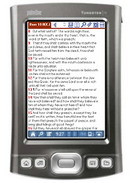 Steps for installing PalmBible+ :
A. First Download the application/software to read the Bible (in .PDB/.PRC format):
>> Download FREE PalmBible+ via palmbibleplus.sourceforge.net
>> Install PalmBible+ reader on your device.
B. Copy the .PDB file of the Bible to your device.
There are many Bibles in .pdb format on the Internet. You can get many language versions (.pdb) from PalmBible+.
Bible in Indonesian can be downloaded from www.fica.org/PembacaAlkitab/
In fica.org, you'll get some Indonesian versions: LAI Terjemahan Baru (New Translation), LAI Terjemahan Lama (Old Translation), LAI Bahasa Indonesia Sehari-hari (Indonesian Daily Language), Bahasa Batak Toba (Batak Toba Language).
Alternatively, Holy Bible in Chinese, English (King James Version / KJV), Spanish, etc is available from here.
Steps for reading the Bible:
>> Start PalmBible+ reader on your device/mobile phone.
>> Open the .PDB file in PalmBible+ on your device.
3. Mobipocket Reader (app) + Bible in .PRC format (e-book format)
This app is basically an e-book reader. With Mobipocket Reader you can read Content on your PDA and smartphone e.g. Palm OS, Windows Mobile (WinMo) Pocket PC, BlackBerry, Symbian OS including S60, UIQ, S80, S90, PC, Cybook, iLiad, Pepper-Pad.

Steps for installing:
A. First Download the application/software to read the Bible (in .PRC format):
>> Download FREE Mobipocket Reader via www.mobipocket.com
>> Install Mobipocket reader on your device.
B. Copy the .PRC file of the Bible to your device.
Here's one of the english translation in Mobipocket Reader PRC format:
>> Download Holy Bible (KJV split by books) via www.handango.com
(* KJV : King James Version)
Steps for reading the Bible:
» Start Mobipocket reader on your device/mobile phone.
» Open the PRC file in Mobipocket reader on your device.
4. Go Bible for Java phones
Go Bible is a Free Bible viewer application for Java mobile phones (J2ME MIDP 1.0 and MIDP 2.0). Go Bible Features: Christ's Words in red, SMS scriptures, Bookmarks, History, Coloured themes, Fast search.

More information for Go Bible for Java and Steps for installing here.
*UPDATE : Untuk berbagai versi GoBible berbahasa Indonesia dapat ditemukan di http://easysby.multiply.com/journal. Thanks for contacting, easysby.
5. Pocket e-Sword (app) for Windows Mobile Smartphone/PocketPC + Bible in .bbl format
In case you have a smartphone/PDA/PocketPC with Windows Mobile 5/6, you can use an application by Rick Meyers called "Pocket e-Sword" as the bible reader. The bibles come in .bbl format, you can download it from the same website below.

Pocket e-Sword Minimal system requirements include:
+ Desktop PC running Windows 95, 98, Me, NT4, 2000, or XP
+ Strong Arm/XScale based PDA or phone running Pocket PC 2003/2003SE, Windows Mobile 5, or Windows Mobile 6
+ PDA must have a "touch screen".
Steps for installing Pocket e-Sword :
A. First Download the application/software to read the Bible (in .bbl format):
>> Download FREE Pocket e-Sword via www.e-sword.net/pocketpc/downloads.html
(Installer file in .exe, but don't worry, you should install it easily using Microsoft ActiveSync, the app to connect your smartphone to PC ) Yeah, you had better read more the general installation instructions on that page :)
B. Choose and download the Bible files you want on the same page.
>> Install the .bbl bibles on your Windows Mobile-based device.
(Installer is still in .exe, but don't worry, it will be .bbl on your pocketpc later after being installed using Microsoft ActiveSync)
Steps for reading the Bible:
» Start Pocket e-Sword on your WM device/smartphone.
» First time you run the app, it will automatically search the bibles (after installing the .bbl bible, please do the option B, of course), or point to where you place the bibles if asked.
6. and more. (can be searched via Google)
Jesus Bless You


