Tweak Shut Down Speed Windows XP

Tweak Shut Down Speed Windows XPHow Great ! So your internet speed is now Excellent after you’ve applied some tweaks [Tweak Internet Speed category ]. You say, “I can always browse internet online faster than before”. That’s what you experience while connected via online, a happy experience you have. You surf all internet world smoother than before. You are satisfied with all hwdot.com tutorials to tweak internet speed.

Sometime you are online for hours with no regrets. And then a close friend of yours calls you up by accident. Your friend invites you to hang out together with some lovely friends. You say it’s okay, so you should be off-line immediately, to finish your session of browsing because you don’t yet take a bath and prepare all things. You should disconnect, then shut down your computer. You press start then turn off computer and you are waiting the shut down process. But what happens? Oh No! it’s sooo slower than you expect! You wonder “How to tweak shut down speed ?!”. You don’t know how, You’re speechless and take the fact in painful way.

After all the posts to tweak internet speed online, Now hwdot.com wants to share How to Tweak Shut Down Speed while you are off-line and you’re already ready to turn off your computer. As we know, All the shut down process in Windows XP depends on your computer specs. But, Your computer does have already High Specifications and It is still Slow just to turn off. You say, I want some tweaks to make the process …

FASTER!!!

Take it easy, as you are browsing www.HWDOT.com, you are in the right place now, Here are some tips for solving the problem. You can open registry editor (regedit.exe) then apply a little tweak.

Here step by step to Tweak Shut Down Speed in Windows XP > Registry Editor :

1. Go to “RUN” and type : regedit.exe
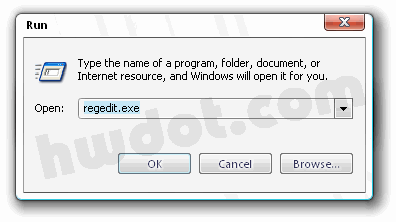
Tweak Shut Down Speed Open Run

2. HKEY_LOCAL_MACHINE > System > ControlSet001 > Control

3. Double Click > “WaitToKillServiceTimeOut”
Tweak Shut Down Process Control

4. Edit String , Value Data 20000 change to > 100
Tweak Shut Down Speed Edit String

5. click OK, and Restart your computer.

You can feel a FASTER process in the next SHUT DOWN.

What?!! your ONLINE is not Great huh?! Read Tweak Internet Speed category dude.. and maximize your Browsing speed with Mozilla Firefox ( 2x Faster than Internet Explorer! ) :

www.HWDOT.com

0 Responses to “Tweak Shut Down Speed Windows XP”


  1. No Comments

Leave a Reply